Full stack
Online Movie Tickets Booking System
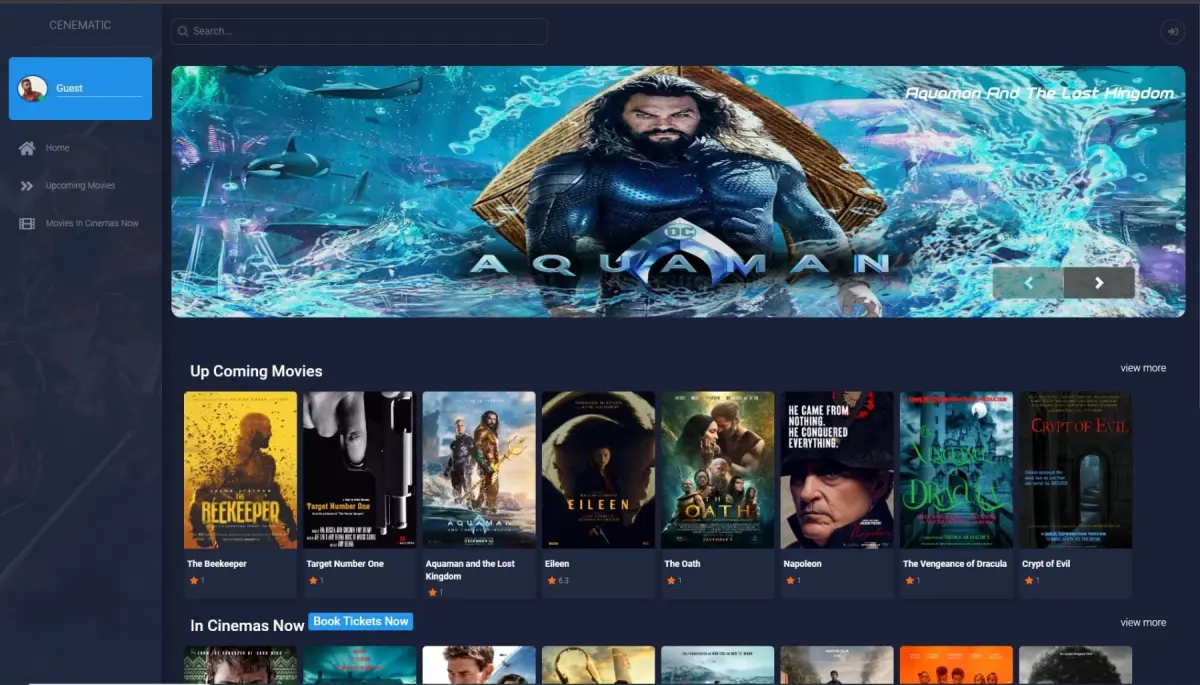
This project was developed during my student years as part of my coursework. At the time, I was actively learning and practicing Core PHP and MySQL, and I wanted to challenge myself by building a real-world application that demonstrated my grasp of backend logic, database design, and user session handling. While it doesn’t include actual payment processing, the system simulates a complete movie ticket booking workflow—from user registration to seat selection—making it a strong academic showcase of CRUD operations, form validation, and dynamic UI rendering.
I’ve included this project in my portfolio to show potential clients and recruiters how I approached problem-solving and application architecture early in my development journey. It reflects my foundational understanding of full-stack development and my commitment to building functional, user-friendly systems—even with limited resources.The full source code is available on GitHub as an open source PHP MySQL project for anyone looking to learn or reference a beginner-friendly ticket booking system.
Project Workflow
- A user lands on the homepage and browses available movies and showtimes.
- To book a ticket, the user must first register and log in.
- Once authenticated, the user selects a movie, chooses a date and time, and is presented with a dynamic seat layout.
- The user selects their preferred seats, and those seats are instantly marked as reserved for other users.
- A simulated payment section is included to complete the booking flow — no real transaction occurs.
- Users can also update their profile information including name, gender, age, and contact details.
On the admin side, the system allows full control over movie listings, schedules, and user management. Admins can add new movies, update showtimes, and view user details—all through a secure dashboard.
Key Features
User Side
- User registration and login with session handling
- Browse movies and available showtimes
- Interactive visual seat selection layout
- Real-time seat reservation to prevent double booking
- Simulated payment flow for a complete booking experience
- Profile management — update name, gender, age, and contact details
Admin Panel
- Secure admin login
- Approve and manage user registrations
- Add and update movie listings and showtimes
- View and edit user details
- Auto-reserve seats upon booking confirmation
What I Learned and Practiced
1. Building a Dynamic Alphanumeric Seat Layout with JavaScript and jQuery
The most challenging part of this project was rendering a cinema-style seat grid entirely on the frontend using JavaScript and jQuery. Each seat is identified by an alphanumeric label — rows represented by letters (A, B, C...) and columns by numbers — similar to how real cinema booking systems work. I had to dynamically generate this grid, map each seat to its database record, and visually distinguish between available, selected, and already-reserved seats using jQuery DOM manipulation. This was my first experience building a real interactive UI component from scratch without any library or plugin.
2. Syncing Frontend Seat Selection with the MySQL Database via PHP
Once a user selected seats on the frontend grid, I had to reliably pass those selections to the PHP backend and update the database so those seats would appear as reserved for all other users. Handling the coordination between the interactive JavaScript UI and the PHP/MySQL backend — ensuring seat state was consistent on page load and after booking — was a significant learning experience in how the client and server communicate through form submissions and PHP superglobals.
3. PHP Session-Based Authentication
Implemented user registration and login using PHP sessions. This taught me the fundamentals of stateful authentication — how sessions are created, stored on the server, and destroyed on logout — before I moved on to more advanced systems like JWT-based authentication in later projects.
4. MySQL Database Design and Raw SQL CRUD Operations
Designed the relational database schema from scratch covering users, movies, showtimes, seats, and bookings. Writing raw SQL queries for all CRUD operations — without an ORM — helped me understand joins, foreign keys, and relational data modeling at a foundational level that carried forward into my later Laravel and Sequelize projects.
5. Bootstrap 5 Responsive Layout and jQuery UI Interactions
Used Bootstrap 5 to build a mobile-friendly, responsive layout and jQuery to handle all DOM interactions beyond the seat grid — including form validation, dynamic content updates, and UI state changes. This project was my practical introduction to combining a PHP backend with a JavaScript-driven frontend before I transitioned to modern frameworks like React.
6. Admin Panel with Role Separation Using PHP Session Checks
Built a separate admin dashboard for managing movies, showtimes, and users. Separating admin routes and views from public user-facing pages using PHP session checks introduced me to the concept of role-based access control before I implemented it more formally in later projects.
Conclusion
This Core PHP and MySQL movie ticket booking system was a significant milestone in my development journey. Building a complete, database-driven web application from scratch — without any framework — gave me a solid foundation in backend development, SQL, and full-stack thinking. The skills and problem-solving approach I developed here directly carried forward into my later projects using Laravel, React, and Node.js.
The full source code for this PHP MySQL ticket booking project is available on GitHub for anyone looking to study or reference a beginner-friendly, real-world PHP application.
Up Next